
🏠 Home β€Ί Software

Airtool 2.7.7 for macOS Free Download

πŸ“… August 11, 2026 πŸ• 4 min read
Version
2.7.7
Size
18 MB
Category
macOS Applications
Updated
August 11, 2026
Downloads
559

Airtool for macOS – Professional WiFi Packet Capture, Wireless Network Analysis & AirPort Utility for Mac

Airtool for macOS - MacHubSoft

Airtool for macOS is a wireless network utility designed for capturing WiFi traffic from compatible Mac hardware and external wireless adapters. It works alongside packet analysis software such as Wireshark, allowing network professionals and administrators to inspect wireless traffic and troubleshoot connectivity issues.

The application provides a convenient interface for putting supported wireless interfaces into monitor mode and forwarding captured 802.11 frames to a packet analyzer. This makes it useful when diagnosing wireless networks, investigating connectivity problems, testing network configurations, or studying WiFi traffic in a controlled environment.

Airtool is particularly valuable for users who need more detailed wireless information than standard macOS networking tools provide. Instead of relying only on connection status and signal information, compatible configurations can expose wireless frames for deeper protocol analysis.
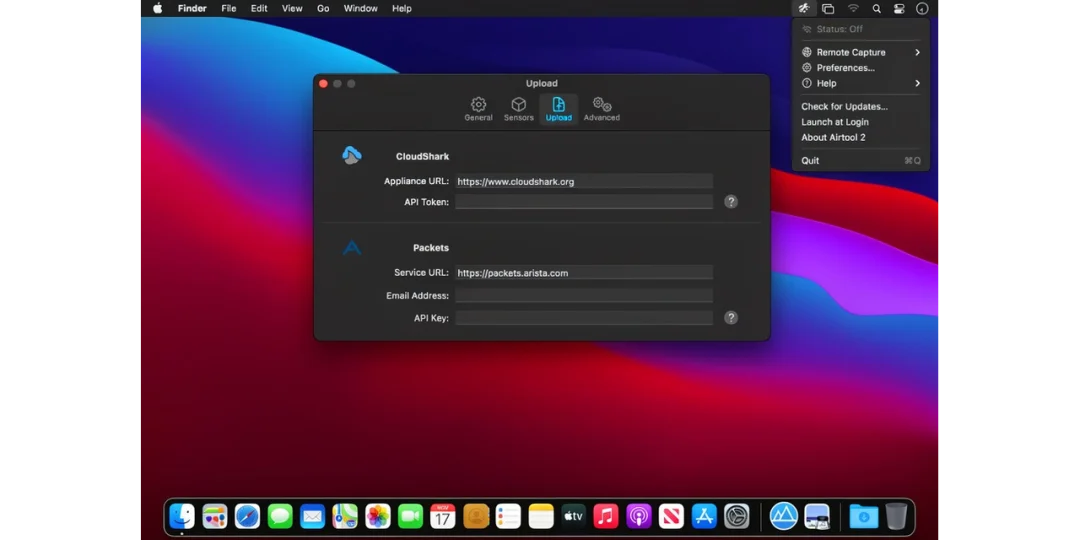
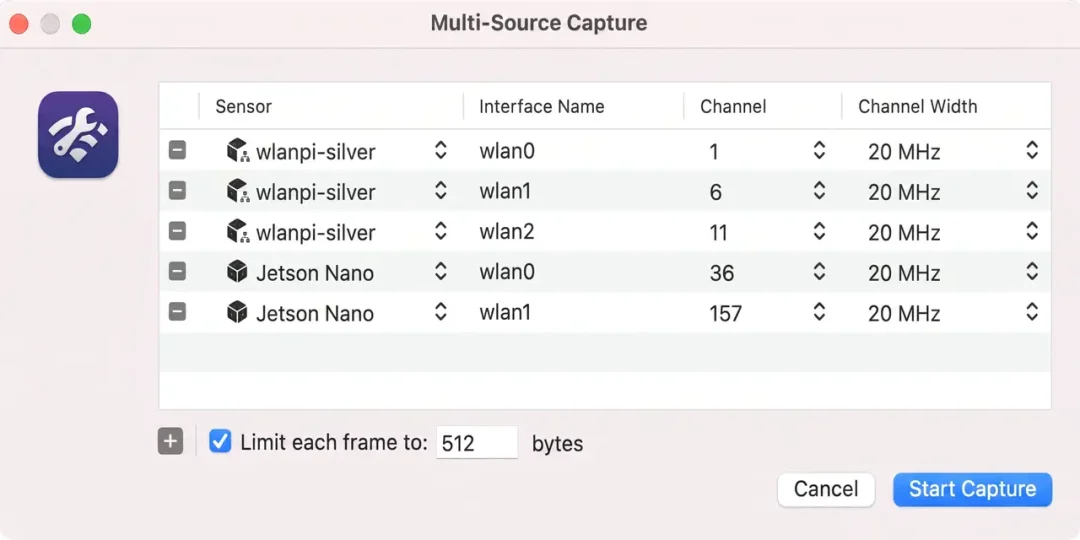
The utility is designed around the macOS networking environment and integrates with professional analysis workflows. Its straightforward interface helps experienced network users configure capture settings without requiring a large standalone networking suite.

Supported Operating Systems

  • macOS
  • Compatible versions depend on the Airtool release
  • Support may vary by Mac hardware and wireless adapter

Processor Support

  • Intel Macs
  • Apple Silicon Macs where supported by the specific Airtool version and capture hardware

Features

β€’ WiFi Packet Capture

Capture wireless network traffic from supported interfaces for analysis and troubleshooting.

β€’ Monitor Mode

Enable monitor mode on compatible wireless hardware to observe 802.11 traffic beyond normal client operation.

β€’ Wireshark Integration

Send captured wireless packets directly to Wireshark for detailed protocol inspection and analysis.

β€’ Wireless Troubleshooting

Use packet captures to investigate connectivity problems, authentication issues, roaming behavior, and other wireless network conditions.

β€’ External Adapter Support

Compatible external WiFi adapters can provide additional capture capabilities when supported by the Airtool release and macOS environment.

β€’ 802.11 Frame Analysis

Capture wireless frames that can be examined in a packet analyzer to understand network communication.

β€’ Simple Capture Controls

Configure the capture interface and start or stop wireless packet collection from a focused Mac interface.

β€’ Professional Networking Workflow

Designed for network administrators, security researchers, developers, and technical users working with wireless networks.

β€’ macOS Integration

Works within the Mac networking environment and can complement existing wireless diagnostic tools.

What’s New

  • Improved compatibility with newer macOS releases
  • Updated wireless capture support
  • Improved Wireshark integration
  • Better compatibility with supported WiFi adapters
  • Improved capture stability
  • Updated interface and configuration options
  • General performance improvements and bug fixes

Why Download Airtool?

  • Capture wireless traffic on Mac
  • Analyze WiFi communication with Wireshark
  • Troubleshoot wireless network problems
  • Work with monitor mode on compatible hardware
  • Inspect 802.11 frames
  • Useful for network administration
  • Suitable for WiFi testing and diagnostics
  • Integrates with professional packet analysis workflows

Frequently Asked Questions

What is Airtool used for?

It is a macOS utility used to capture wireless network traffic from compatible WiFi interfaces and make those captures available for analysis with applications such as Wireshark.

Can it work with Wireshark?

Yes. it is designed to work with Wireshark and can provide wireless packet captures for detailed protocol analysis.

Does it support monitor mode?

Yes, monitor mode is a core feature when supported by the Mac hardware, wireless interface, adapter, and macOS version being used.

Does it work on Apple Silicon Macs?

Support depends on the specific Airtool release and compatible capture hardware. Users should verify current hardware and macOS compatibility before installation.

Who uses Airtool?

It is mainly useful for network administrators, wireless engineers, developers, researchers, and technical users who need to inspect WiFi traffic at the packet level.

Is Airtool a replacement for Wireshark?

No. Airtool and Wireshark serve different purposes. it handles wireless packet capture, while Wireshark provides detailed packet inspection and analysis.

Final Verdict

Airtool is a specialized macOS networking utility for users who need access to wireless packet captures rather than basic WiFi connection information. Its integration with Wireshark makes it particularly useful for investigating wireless communication and diagnosing network problems.

For network administrators, wireless engineers, developers, and technical users, Airtool for macOS provides a focused capture workflow that can turn a compatible Mac or wireless adapter into a useful tool for professional WiFi analysis.

Thank you for visitΒ MacHubSoft

official

Γ—
β€Ή RAR Extractor Max – Unzip File 13.9.6 for macOS Download
Technical Information
Software Name
Airtool
Developer
Intuitibits
Category
Software
License
Commercial
Platform
macOS
Architecture
Intel & Apple Silicon where supported
Language
Multilingual
Rating
β˜…β˜…β˜…β˜…β˜… β˜…β˜…β˜…β˜…β˜… 3.1 / 5 (14 votes)
Comments

Leave a Reply

Your email address will not be published. Required fields are marked *