Dropzone Pro for macOS – Smart Drag-and-Drop Productivity, File Management & Workflow Automation Utility for Mac

Dropzone Pro is an advanced productivity application designed to simplify file management and automate everyday tasks on macOS. Instead of navigating through multiple Finder windows, Dropzone Pro lets users drag and drop files onto customizable actions to quickly move, copy, compress, upload, convert, or organize data from one convenient workspace.
Whether you’re a developer, designer, photographer, content creator, or office professional, Dropzone Pro helps eliminate repetitive workflows by placing your most frequently used folders, applications, and automation tools just a single drag away. The application also supports multiple customizable grids, floating file shelves, keyboard shortcuts, and professional upload actions for cloud and server environments.
read also: AltTab Pro
Download Link
✅ Full Version Available
✅ Latest Release
✅ Apple Silicon Supported
✅ Intel Mac Supported
✅ Offline Installer
✅ Advanced Workflow Automation
Supported Operating Systems
- macOS Tahoe
- macOS Sequoia
- macOS Sonoma
- macOS Ventura
- macOS Monterey
Processor Support
- Apple M1
- Apple M2
- Apple M3
- Apple M4
- Intel Macs
Features
• Drag-and-Drop Workflow
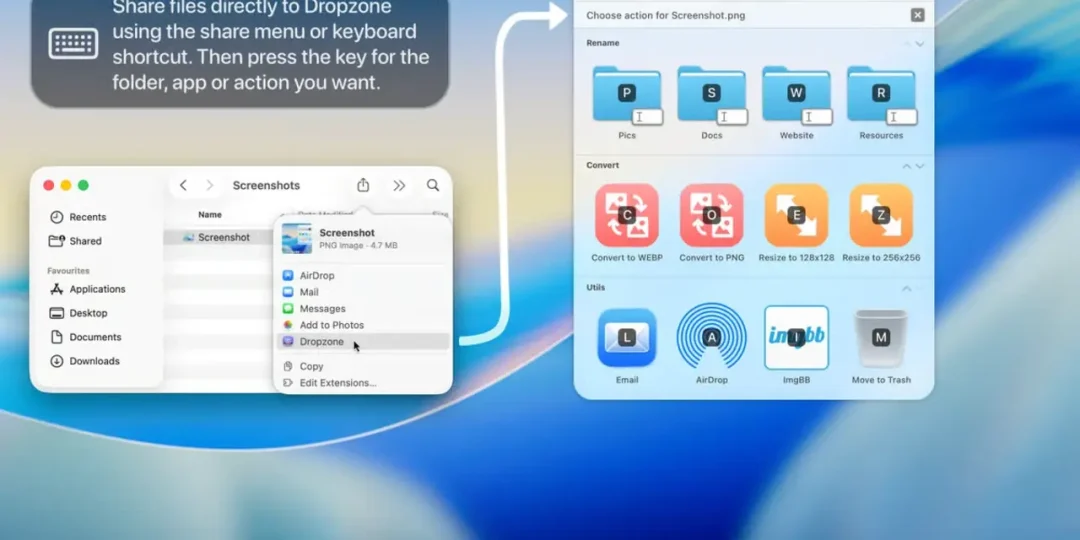
Perform common tasks simply by dragging files onto predefined actions, folders, or applications for faster workflow management.
• Custom Action Grid
Create personalized grids containing frequently used applications, folders, shortcuts, and automation scripts for instant access.
• Multiple Workspace Grids
Organize different sets of actions into separate grids, allowing dedicated workspaces for development, design, productivity, and personal tasks.
• Drop Bar File Shelf
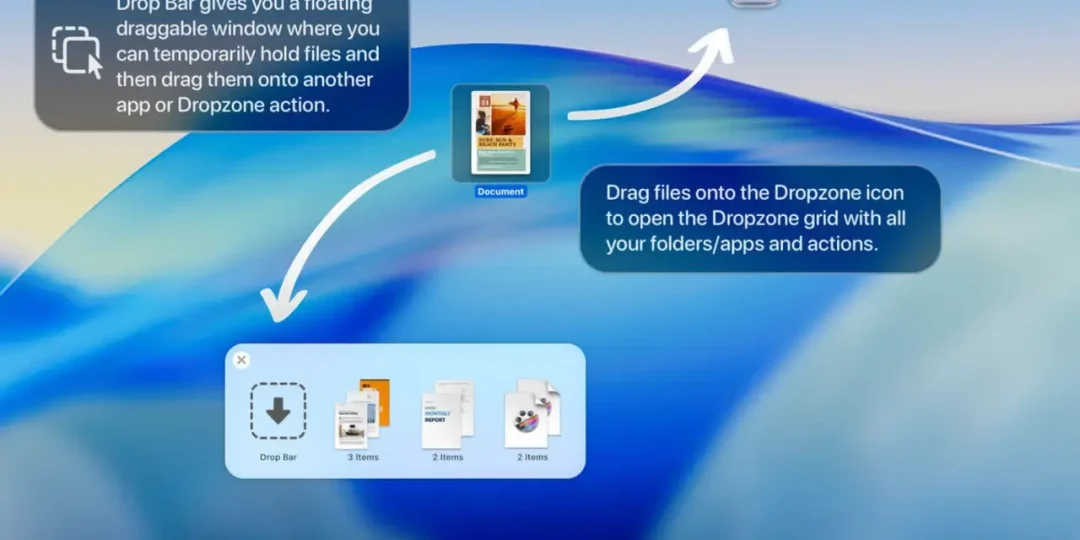
Temporarily store files in a floating Drop Bar while moving content between applications and folders without cluttering your desktop.
• Cloud & Server Uploads
Upload files directly to Amazon S3 and SFTP servers using integrated Dropzone Pro actions for faster file deployment.
• Image Processing Tools
Resize images, convert formats, and perform quick graphic tasks without opening separate editing software.
• AirDrop Integration
Quickly send files to nearby Apple devices through built-in AirDrop support directly from Dropzone.
• Keyboard Shortcut Support
Launch actions, folders, and automation tools instantly using fully customizable keyboard shortcuts.
• Background Task Monitoring
Track uploads, conversions, and automation progress through menu bar indicators and built-in status monitoring.
• Automation & Scripting
Extend functionality using custom actions and automation scripts to create personalized workflows for almost any repetitive task.
What’s New
- Fully redesigned modern interface
- Support for multiple workflow grids
- Improved Drop Bar functionality
- Better Apple Silicon optimization
- Enhanced image conversion tools
- Faster background task execution
- Updated workflow automation features
- General performance improvements and bug fixes
Why Download Dropzone Pro?
- Speed up everyday file management
- Automate repetitive workflows
- Organize frequently used folders
- Upload files directly to cloud services
- Improve productivity with drag-and-drop actions
- Access custom shortcuts instantly
- Manage files without Finder clutter
- Optimized for modern Apple hardware
Frequently Asked Questions
What is Dropzone Pro used for?
Dropzone Pro helps users automate file management tasks such as copying, moving, uploading, converting, and organizing files using an intuitive drag-and-drop interface.
Does Dropzone Pro support Apple Silicon Macs?
Yes. The latest version is fully optimized for Apple M1, M2, M3, and M4 processors.
Can I upload files to cloud storage?
Yes. Dropzone Pro supports direct uploads to Amazon S3, SFTP servers, and other supported services through built-in actions.
Does it include keyboard shortcuts?
Absolutely. Users can assign custom shortcuts to launch actions, folders, and workflow automations instantly.
Can I customize the action grid?
Yes. The application allows complete customization of action grids, folders, applications, and automation tools.
Is Dropzone Pro suitable for professional users?
Yes. Developers, designers, photographers, IT professionals, and office users can significantly improve their productivity through its automation and file management features.
Final Verdict
Dropzone Pro is one of the most effective productivity utilities available for macOS users in 2026. By combining drag-and-drop automation, customizable action grids, cloud uploads, floating file shelves, and intelligent workflow management, it transforms everyday file handling into a faster and more efficient experience. Whether you’re organizing projects, automating repetitive tasks, or managing professional workflows, Dropzone Pro provides a powerful solution that integrates naturally into the macOS environment.
Thank you for visit MacHubSoft