ProFind for macOS – Advanced File Search, Finder Replacement & Professional Disk Discovery Tool for Power Users
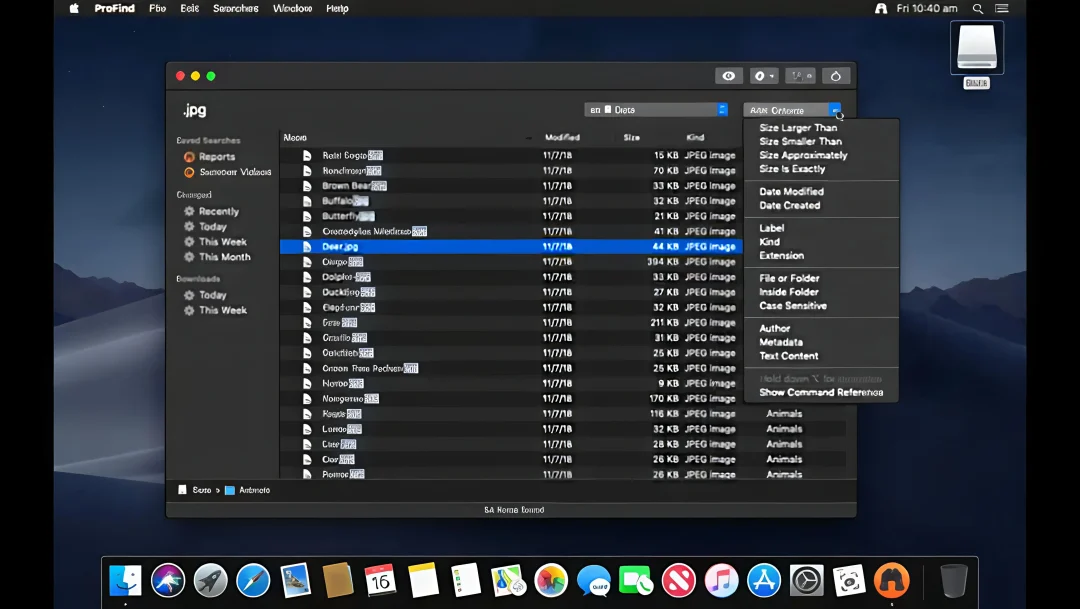
ProFind is a professional file search application for macOS that goes far beyond the capabilities of traditional Finder and Spotlight searches. It combines kernel-based searching, metadata indexing, optional disk caching, and natural-language queries to deliver fast and comprehensive results across local drives, external disks, servers, and network volumes.
Designed for developers, content creators, researchers, and power users, ProFind makes it possible to locate files by name, tags, content, size, dates, extensions, metadata, and even image recognition. The software also supports hidden folders, package contents, scripting, and advanced Boolean queries, making it one of the most powerful search utilities available for macOS.
Also Read: Multi-List Timer
Download Link
✅ Full Version Available
✅ Latest Release
✅ Apple Silicon Supported
✅ Intel Mac Supported
✅ Offline Installer
✅ Advanced Search Engine Included
Supported Operating Systems
- macOS Sequoia
- macOS Sonoma
- macOS Ventura
- macOS Monterey
- macOS Big Sur
Processor Support
- Apple M1
- Apple M2
- Apple M3
- Apple M4
- Intel Macs
Features
• Natural Language Search
Find files using plain English commands and intelligent autocomplete suggestions for applications, keywords, and search operators.
• Search Any Disk Type
Locate files across internal drives, external storage, servers, network volumes, Windows disks, and removable devices.
• Hidden Folder Scanning
Search inside invisible directories, package contents, and system folders that standard Finder searches may overlook.
• Advanced Boolean Queries
Combine multiple search conditions using AND, OR, NOT, and grouped expressions for highly precise results.
• Content-Based Searching
Search text within PDFs, Word documents, RTF files, and other supported formats with highlighted matches.
• Image Recognition Technology
Find images based on visual content using on-device machine learning capabilities available in modern macOS versions.
• Optional Disk Caching
Build local indexes for faster searches, especially on network drives and disconnected storage devices.
• Shell Script Integration
Run Shell scripts, AppleScripts, and macOS Shortcuts directly from search results to automate workflows.
• Saved Searches & History
Store frequently used searches and quickly revisit previous queries through an organized sidebar interface.
• CSV & Text Exporting
Export search results for documentation, auditing, development projects, or organizational tasks.
What’s New
- Added visual query editor support
- Improved external disk searching
- Enhanced non-English character input
- Better Apple Silicon optimization
- Faster repeated searches through disk caching
- Improved interface responsiveness
- Stability enhancements
- General bug fixes and refinements
Why Download ProFind?
- Search faster than traditional Finder methods
- Locate hidden files and packages
- Perform advanced Boolean queries
- Search document contents instantly
- Automate workflows using scripts
- Access saved searches and history
- Support network and external drives
- Enjoy a professional search experience
Frequently Asked Questions
What is ProFind used for?
ProFind is an advanced macOS search utility designed to locate files using natural-language commands, metadata, content searching, and powerful filters.
Does ProFind require Spotlight?
No. Most search functions operate independently of Spotlight, although Spotlight metadata can optionally be used for certain queries.
Can it search hidden folders?
Yes. ProFind supports searching inside invisible folders, packages, and system directories.
Does it support Apple Silicon Macs?
Yes. The latest versions are fully compatible with Apple M1, M2, M3, and M4 processors.
Can I automate actions with scripts?
Absolutely. Users can run Shell scripts, AppleScripts, and Shortcuts directly from search results.
Is it suitable for developers?
Yes. Advanced filters, regex support, scripting integration, and fast disk searches make it an excellent productivity tool for developers and technical users.
Final Verdict
ProFind stands out as one of the most capable file-search utilities available for macOS in 2026. Combining natural-language searches, hidden-folder access, scripting support, image recognition, and high-performance disk indexing, it offers a substantial upgrade over traditional Finder and Spotlight workflows. For professionals who manage large amounts of data or require advanced search capabilities, ProFind delivers a powerful and efficient solution.