WhatCable Pro Download for macOS – Advanced USB-C Cable Diagnostics, Charging Analysis & Thunderbolt Monitoring Utility for Apple Silicon Macs

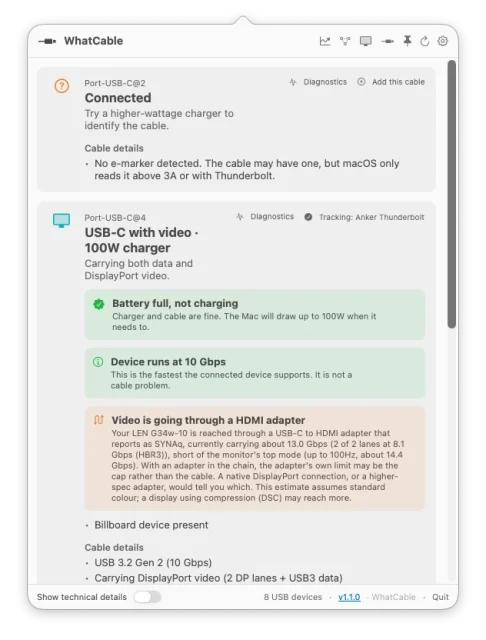
WhatCable Pro is a modern macOS utility designed to eliminate the confusion surrounding USB-C cables and charging accessories. While many cables look identical, their actual capabilities can vary dramatically—from simple charging-only cables to high-speed Thunderbolt 4 and USB4 connections. WhatCable Pro translates complex hardware information into clear, human-readable diagnostics directly from the macOS menu bar.
The application helps users determine charging limitations, data transfer speeds, display compatibility, cable quality, and connected device information without requiring specialized hardware testers. Whether you’re a developer, content creator, photographer, or everyday Mac user, WhatCable Pro makes understanding USB-C ecosystems significantly easier.
These days, nearly every new device comes with its own USB-C cable in the box, so it doesn’t take long before you’ve got a drawer overflowing with them—each looking identical, yet none clearly labeled for what it can actually do. The catch is that not all USB-C cables are created equal. Depending on the cable, you might get very different limits on:
- How fast data can transfer
- How much video bandwidth it can carry
- How much power it can deliver
Like it: WatsGo
Download Link
✅ Full Version Available
✅ Latest Release
✅ Apple Silicon Supported
✅ Offline Installer
✅ Thunderbolt Diagnostics Included
✅ Professional USB-C Analysis Tools
Supported Operating Systems
- macOS Sequoia
- macOS Sonoma
- macOS Ventura
- macOS 14 or later
Processor Support
- Apple M1
- Apple M2
- Apple M3
- Apple M4
Features
• USB-C Cable Identification
Instantly discover whether a cable supports charging, Thunderbolt, USB4, high-speed data transfer, or display connectivity.
• Charging Bottleneck Detection
Identify whether slow charging originates from the cable, charger, connected device, or Mac hardware itself.
• Thunderbolt & USB4 Monitoring
Inspect active Thunderbolt generations, lane speeds, and supported protocols for connected devices.
• Power Delivery Analysis
View complete Power Delivery profiles, negotiated voltages, current usage, and supported charging capacities.
• E-Marker Cable Information
Read cable identification chips to determine manufacturer details, power ratings, and maximum supported speeds.
• Device Mapping
Display exactly which peripherals are connected to each physical USB-C port and their negotiated transfer speeds.
• Cable Trust Diagnostics
Detect unusual or suspicious cable characteristics that may indicate poor-quality or incorrectly labeled accessories.
• JSON & CLI Support
Export diagnostic data for scripting, automation, development workflows, and technical troubleshooting.
• Notification System
Receive alerts when cables, chargers, or peripherals are connected or disconnected from your Mac.
• Lightweight Menu Bar Integration
Access detailed diagnostics without cluttering the desktop or consuming significant system resources.
What’s New
- Enhanced Thunderbolt 5 support
- Improved MagSafe diagnostics
- Better Apple Silicon optimization
- Faster USB device recognition
- Advanced cable trust indicators
- New CLI enhancements
- Improved notification system
- General bug fixes and stability improvements
Why Download WhatCable Pro?
- Eliminate USB-C cable confusion
- Diagnose slow charging instantly
- Identify data transfer limitations
- Verify Thunderbolt compatibility
- Monitor connected peripherals
- Export diagnostic information
- Improve workstation productivity
- Optimize charging and device performance
Frequently Asked Questions
What is WhatCable Pro used for?
WhatCable Pro helps users understand exactly what their USB-C cables, chargers, and connected devices are capable of doing.
Does it support Intel Macs?
Current releases primarily target Apple Silicon Macs because required USB Power Delivery information is exposed through newer hardware interfaces.
Can it identify charging bottlenecks?
Yes. The application determines whether slow charging originates from the charger, cable, or connected device.
Does it support Thunderbolt devices?
Absolutely. Thunderbolt and USB4 diagnostics are among its most important features.
Is a command-line interface included?
Yes. A CLI tool is available for scripting and exporting structured diagnostic data.
Can it detect poor-quality cables?
Yes. The software provides trust indicators based on cable e-marker information and USB-PD specifications.
Final Verdict
WhatCable Pro is one of the most practical utilities released for Apple Silicon users in recent years. By transforming complicated USB-C specifications into understandable information, it helps eliminate charging problems, slow data transfers, and cable confusion. For developers, creators, and professionals who rely on modern USB-C ecosystems, WhatCable Pro offers an essential toolkit for understanding exactly what every cable and accessory connected to their Mac can truly do.